100% private expense tracking

Your finances.
No one else sees them.

Zero-based budgeting, credit cards with installments & BNPL, a spending Heatmap and savings goals. No servers. No accounts.

Download on the App Store

Free · 30 days of Pro included · No card, no sign-up

ZeroBudget Dashboard

No servers. No accounts. No cloud.
Just you and your money.

Unlike other finance apps, ZeroBudget doesn't connect to your bank, doesn't sync to the cloud and doesn't share your data with anyone. Everything lives on your iPhone, protected by iOS.

🔒 Face ID / Touch ID Your data behind a biometric lock
📵 Works offline 100% of the app works without internet
🛡️ Zero tracking No third-party analytics, no ads
💾 Encrypted backup You decide where your copy lives

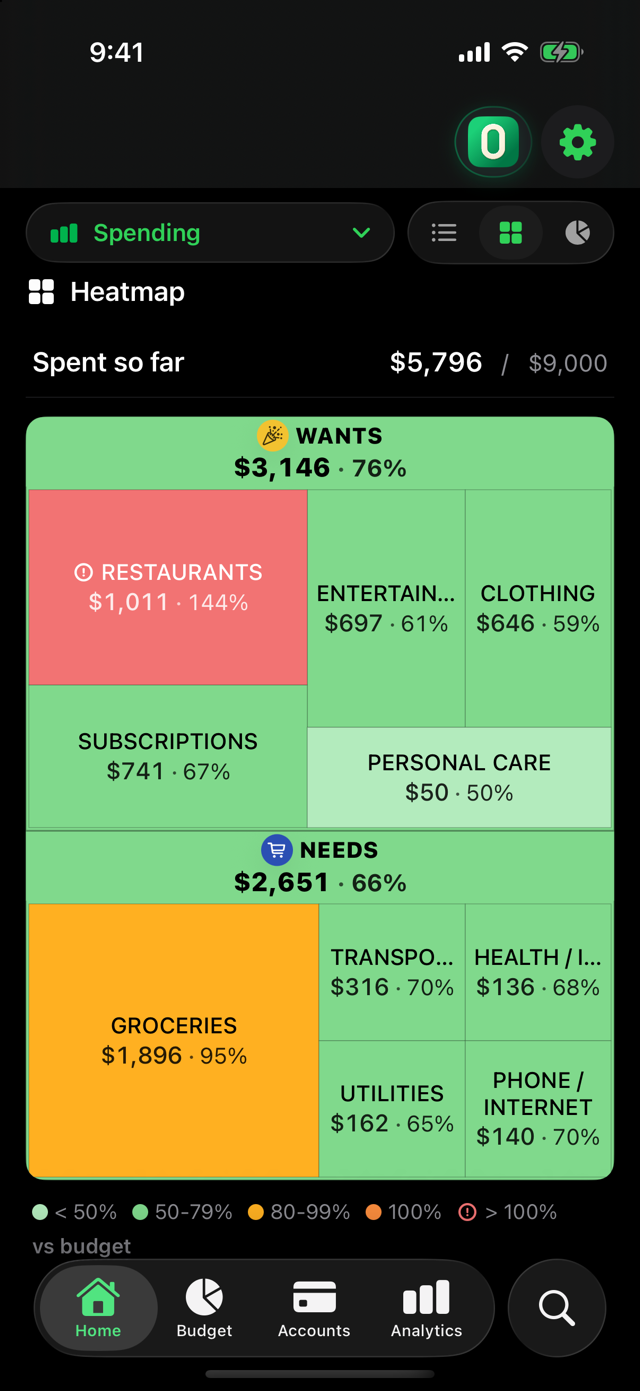
Spending Heatmap

See your money.
Literally.

A visual map of all your spending: every category is a block — its size is how much you spent, its color tells you if you're on track or over. A 3-second glance replaces half an hour of spreadsheets.

Spending Heatmap in ZeroBudget

Zero-Based Budgeting

Every dollar,
with a purpose.

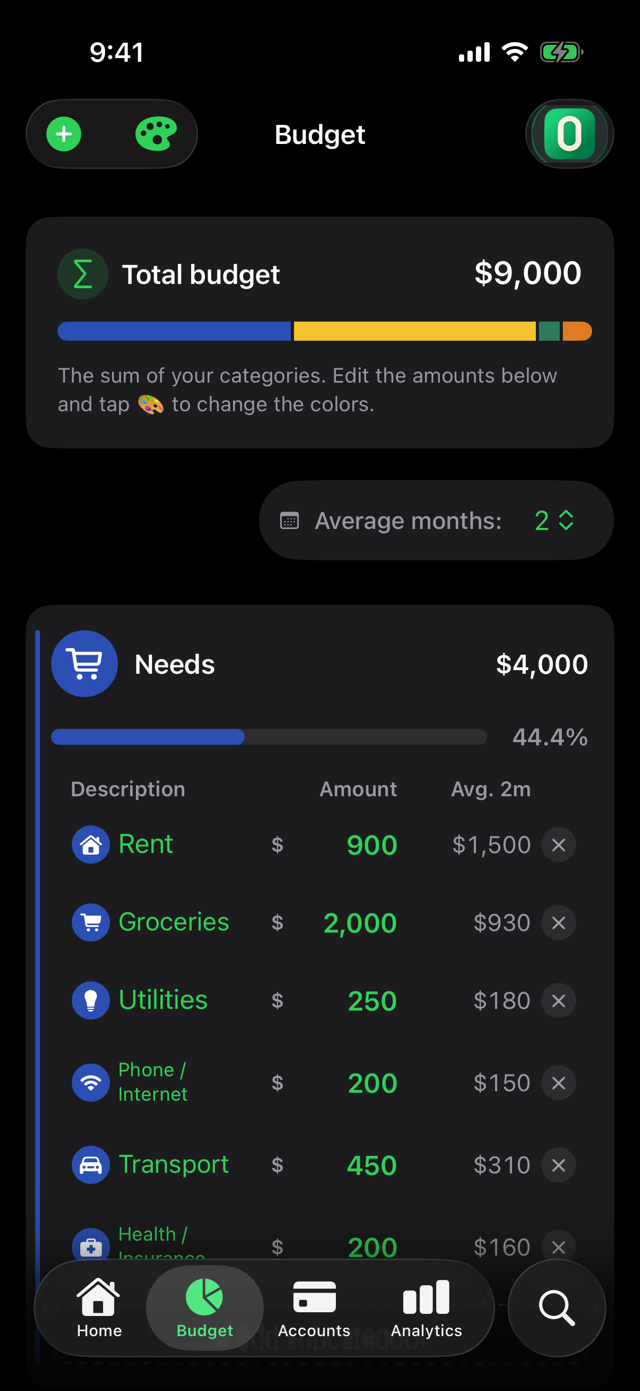
Assign your income to categories with the 50/20/20/10 rule — Needs, Savings, Wants and Debt — before the month begins. Nothing is left "unassigned": you don't just log expenses, you know if you're heading where you want to go.

Budget in ZeroBudget

Credit cards

Installments,
under control.

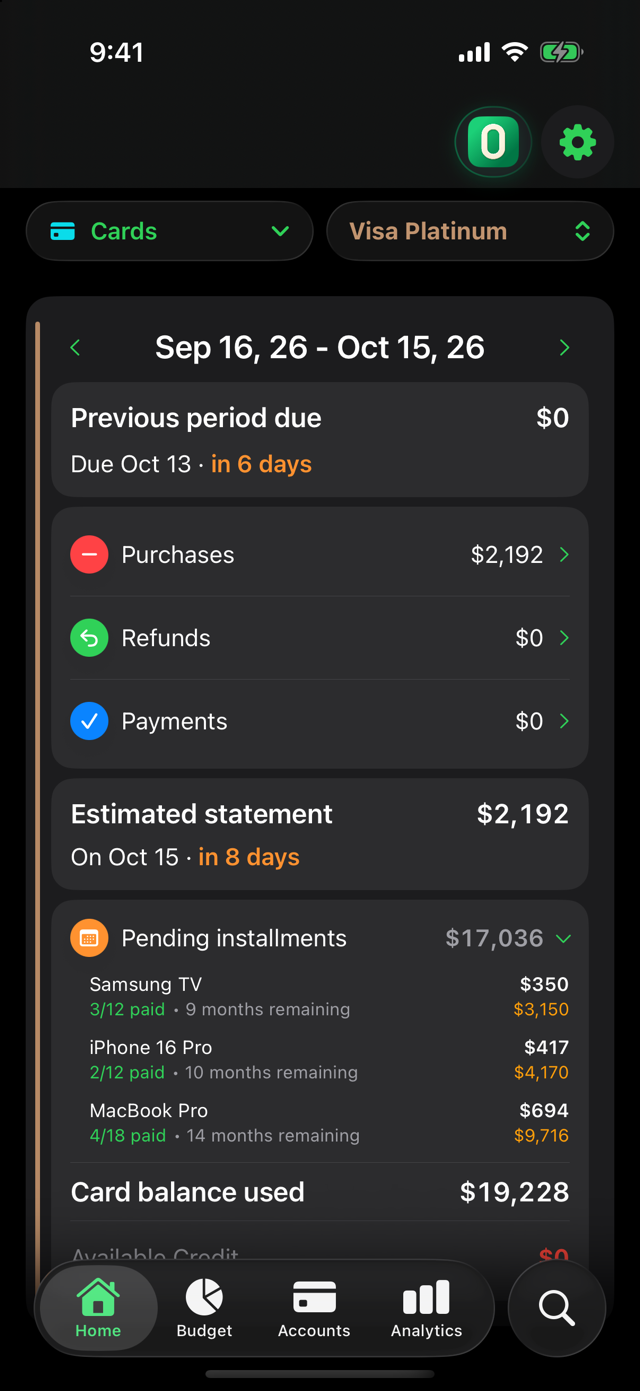
Log a buy-now-pay-later purchase once and the app creates each monthly charge in the month it belongs to. Statement cutoff and payment dates are calculated automatically, with per-cycle balances: you know exactly what's coming on your next statement — and how many months you've already committed.

Few apps in the world handle installments like this. ZeroBudget was born with them.

Installments in ZeroBudget

Smart capture

Log expenses
in seconds.

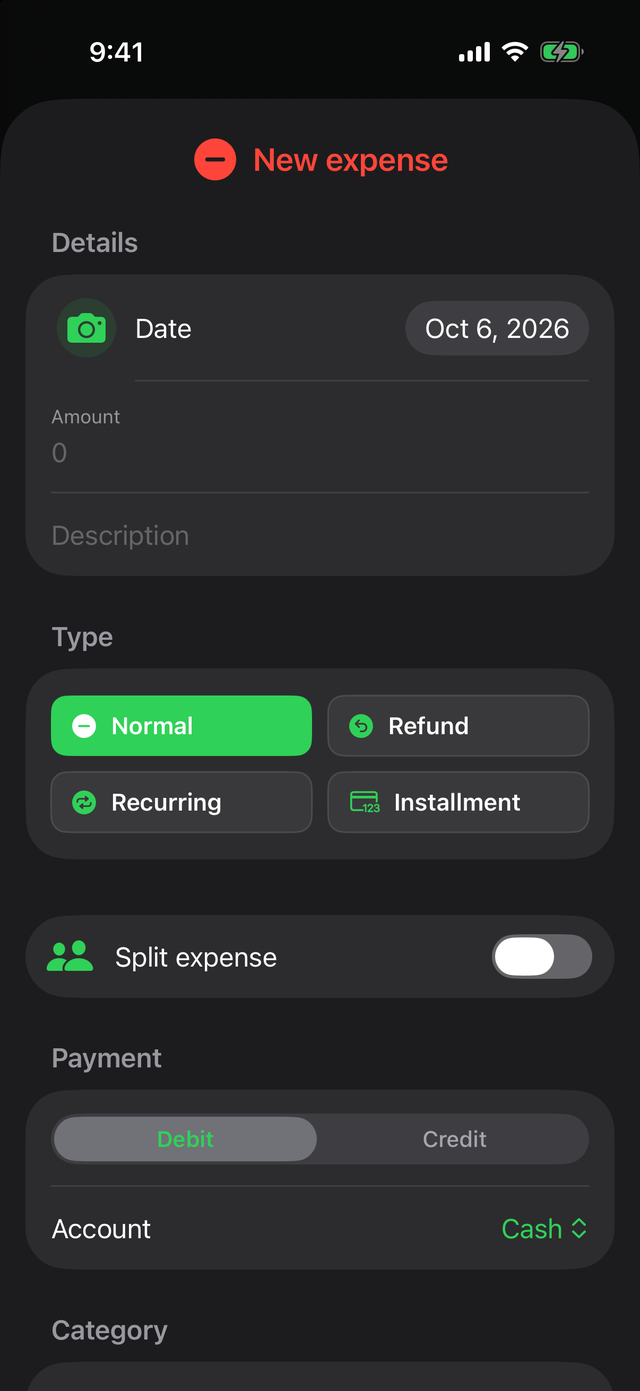
Scan a receipt and the app pulls out the amount for you. Type "Walmart" and it suggests the category, the account, even whether it was an installment — it learns from your habits. Or skip the app entirely: "Hey Siri, add a 500 grocery expense."

Expense capture in ZeroBudget

Family finances New

Share expenses
via AirDrop.

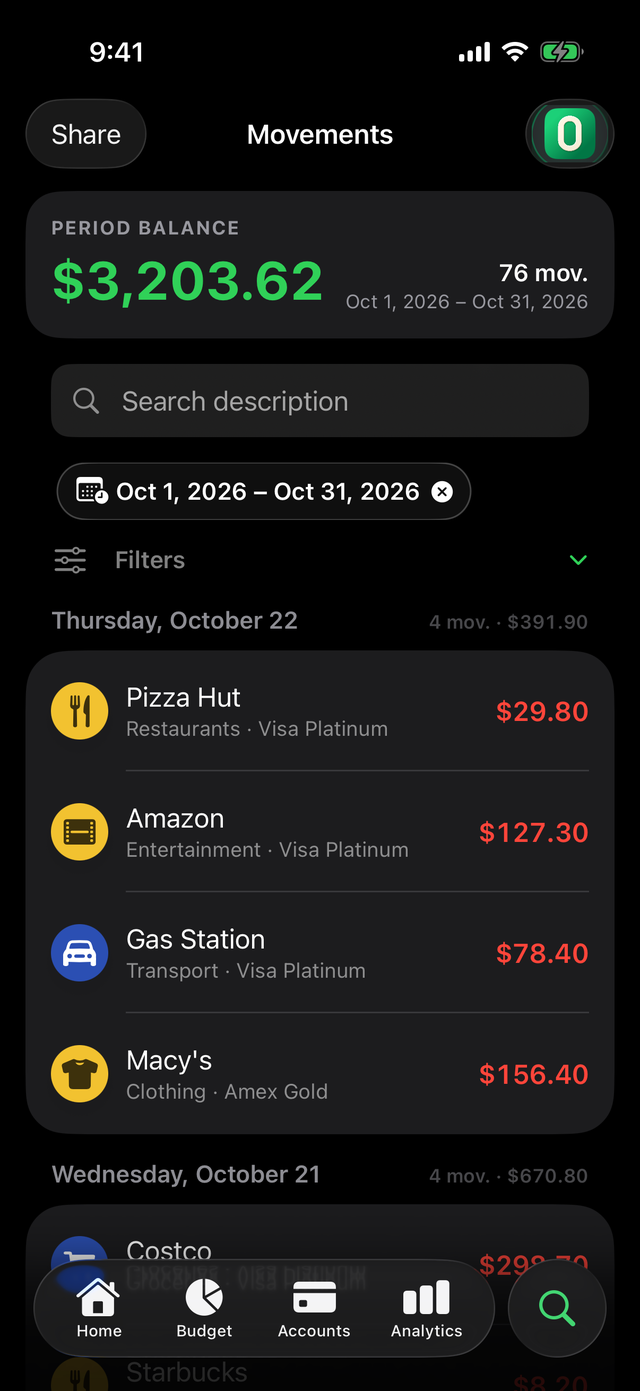
Supplementary family card? Whoever uses it exports their transactions and sends them via AirDrop or Mail. Whoever pays the statement opens them with ZeroBudget and imports them into their own card, with their own categories. No cloud, no shared accounts — the file travels straight from one iPhone to the other.

Sharing transactions in ZeroBudget

Smart analytics

Know your
real patterns.

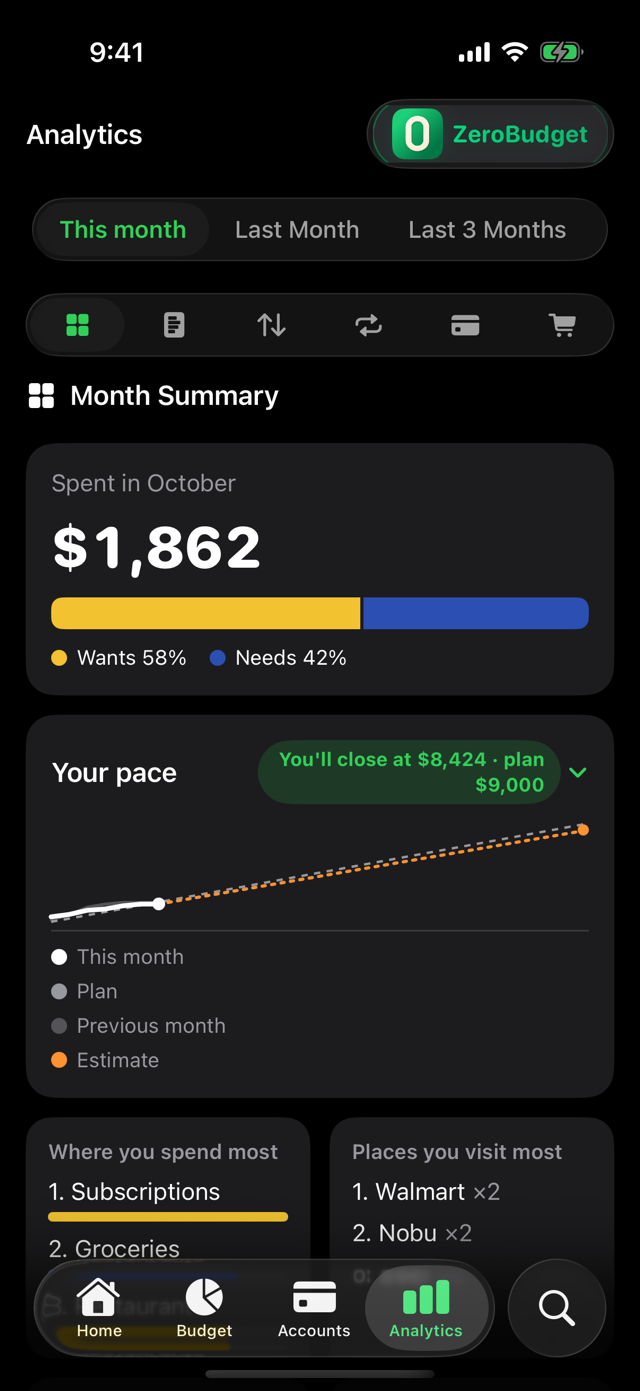
Where your money went, monthly projection, budget alerts, top spending, category trends and savings opportunities. The data you need to decide — before the money is gone.

Analytics in ZeroBudget

Group expenses New

Split expenses,
track who owes you.

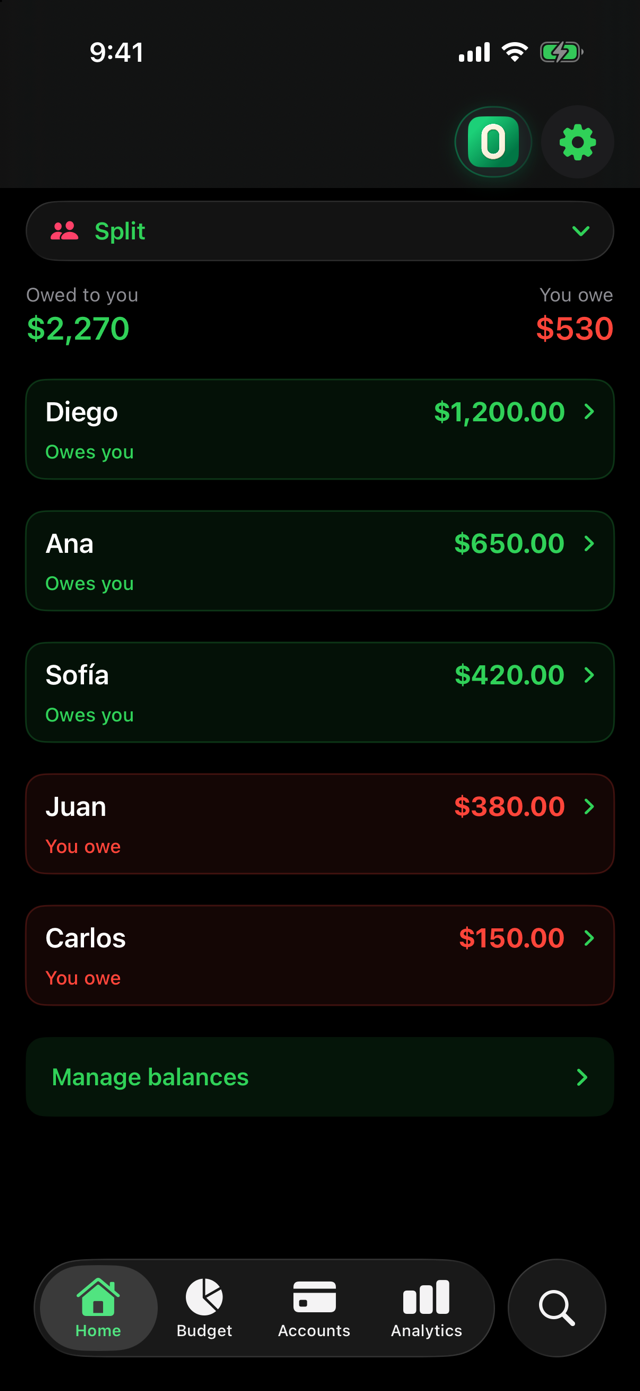
Split a dinner, rent, or any expense equally or by person. Keep track of who owes you and settle up with one tap — no extra apps, no shared accounts, no cloud. Everything lives on your iPhone.

Split expenses in ZeroBudget

Shopping mode New

Your shopping list,
with a live total.

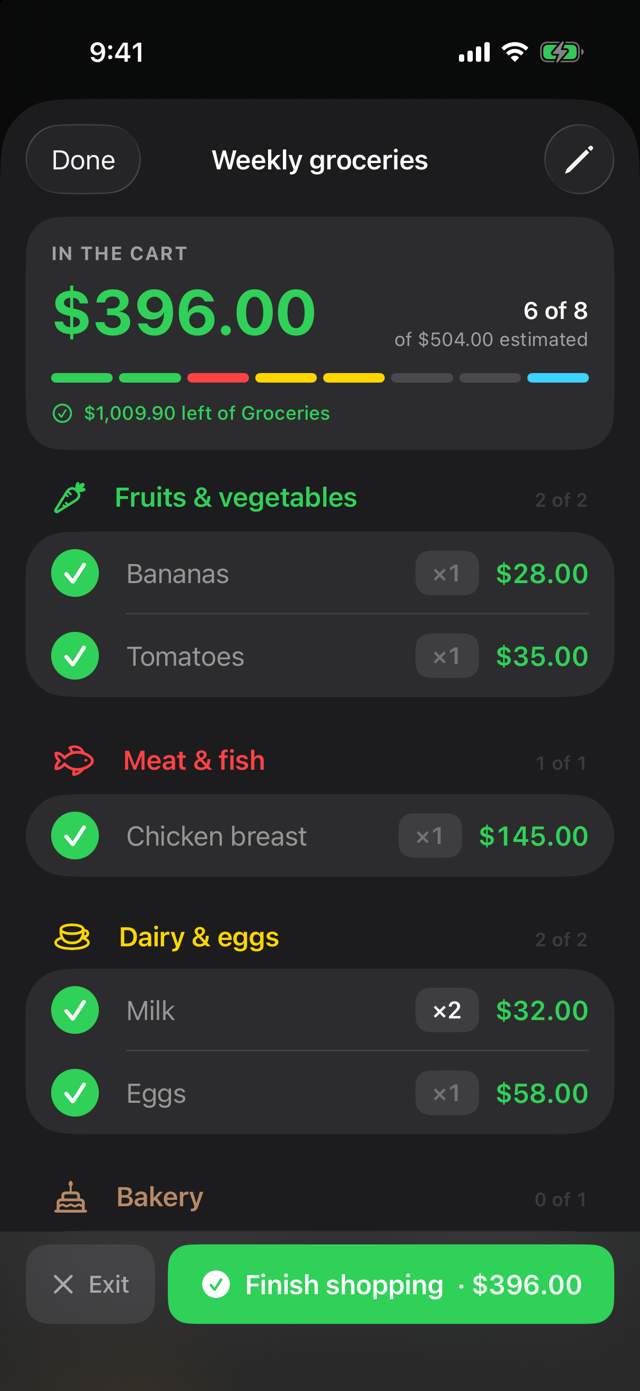
Build the list at home and pick what you are buying this time. In the store, Shopping Mode adds up the cart as you check items off and tells you how much is left of that budget category — with the total on the Lock Screen and in the Dynamic Island, without opening the app. When you are done, the trip is recorded as an expense with its receipt, and every item remembers its last price.

Shopping mode in ZeroBudget

And everything you'd expect from a great app.

Built with care, for everyday use.

🎯

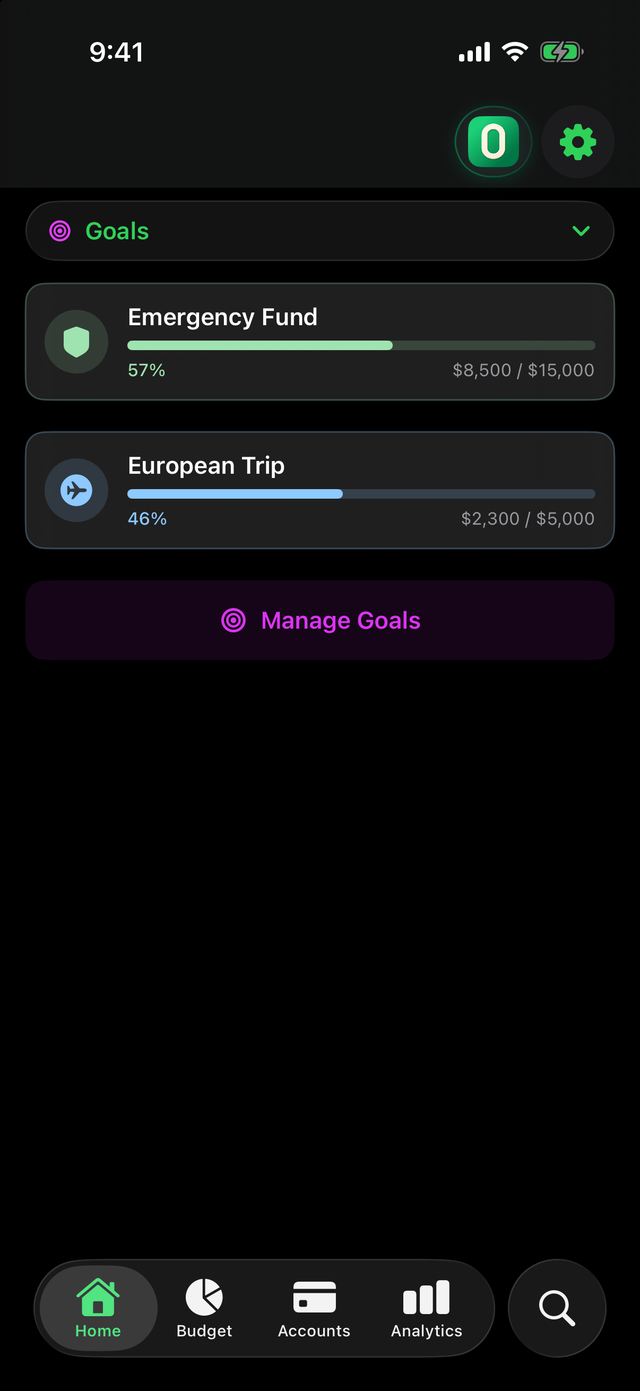
Savings goals

Dedicated account, visual progress, contributions at your pace. Emergency fund, a trip — whatever you're saving for.

📄

Import your bank statement

CSV, Excel or TXT — columns are detected automatically. Hundreds of transactions in seconds.

🔁

Recurring transactions

Rent, subscriptions, payroll: they log themselves on their date, with optional reminders.

🗣️

Siri & Widgets

Log by voice without opening the app, and check your budget from your home screen.

🌙

Full dark mode

Designed dark-first, beautiful in light. Follows your system.

🌎

6 languages

Spanish, English, French, Portuguese, Japanese and Korean. With your local currency.

The essentials, free.
Pro when you want more.

When you install, you get every Pro feature free for 30 days — no card, no sign-up. When it ends, you keep using ZeroBudget for free.

Free, forever

ZeroBudget

Everything you need to get started

  • 2 accounts or cards plus your Cash account
  • Unlimited transactions and real-time budget tracking
  • Credit cards with automatic cutoff, payment dates and installments
  • A savings goal with visual progress
  • Split expenses with friends or family and track who owes you — up to 2 active splits
  • Smart capture + receipt scanning
  • Share transactions via AirDrop or Mail
  • Siri, widgets, recurring transactions and reminders
  • Encrypted backup and Face ID / Touch ID
  • Shopping list with Shopping Mode and a live total — 1 active list

Monthly or annual subscription

ZeroBudget Pro

For next-level analysis

  • Visual spending Heatmap by category and merchant
  • Full analytics: projection, alerts, trends
  • Statement import (CSV, Excel, TXT)
  • Receive the transactions your family shares
  • Password-protected backup you can take to any device
  • Unlimited accounts, goals, installment plans, expense splits and shopping lists
  • Export transactions to CSV
  • Priority support
  • At the store, how much of that budget category you have left as you fill the cart

Designed for people who take their finances — and their privacy — seriously.

0 % offline. Works without internet.
0 languages, available in 15+ countries
0 servers. None of your data in the cloud.

Frequently asked questions

What everyone asks before downloading.

Does ZeroBudget connect to my bank?
No, and that is the point. ZeroBudget never asks for your bank credentials and never links to your bank: you log expenses in seconds, or import your statement from an Excel, CSV or TXT file on your iPhone. That is why it works with any bank in the world.
Does it work offline? Is it really private?
Yes. It is a 100% offline expense tracker: no servers, no account to create, no cloud. Your data lives only on your iPhone, protected by iOS, and you can lock the app with Face ID, Touch ID or a PIN.
Is it a zero-based budgeting app?
Yes. Every dollar of your income gets a job before the month starts, with the 50/20/20/10 guideline: needs, savings, wants and debt. You see in real time how much of each category you have spent, and the app warns you before you go over.
Can it track buy now, pay later and credit card installments?
Yes. You log the purchase once and ZeroBudget creates every monthly charge, follows your card's statement cutoff and payment date, and shows how much of your next statement is already committed.
Can I split expenses with friends and track who owes me?
Yes. Split a bill evenly or by amount, and the app keeps each person's balance until they pay you back. It all stays on your iPhone: unlike apps that upload everything to their cloud, nobody else sees what you spend.
How much does it cost? What is in the free plan?
The download is free and you get 30 days of every Pro feature, no credit card required. After that you keep the free plan: 2 accounts plus cash, unlimited transactions, budgeting, credit cards with installments, 1 savings goal and 2 expense splits. Pro (monthly or yearly) adds the spending Heatmap, analytics, file import and unlimited everything.
Can I import my bank statement?
Yes, with Pro. Open your bank's Excel, CSV or TXT file and the app detects the date, description and amount columns on its own; if something looks off, you map the columns in seconds.
What happens to my data if I switch iPhones or delete the app?
You decide: the app writes an encrypted backup to the folder you choose, including iCloud Drive, and with Pro you can protect it with a password to move it to any device. We never hold a copy, because there are no servers.
Does it work for couples or a household?
Yes. Beyond splitting expenses, a family member can send you the transactions from their supplementary card over AirDrop and you import them into your card without typing anything.
Is there an Android, iPad or web version?
ZeroBudget is an iPhone app today. There is no Android or web version and no online dashboard — which is exactly why your data never leaves your phone.

Your money,
your decisions.

Download ZeroBudget free and try every Pro feature for 30 days. No card. No accounts. No fine print.

Download on the App Store