What's worth tracking
- The amount of each monthly payment.
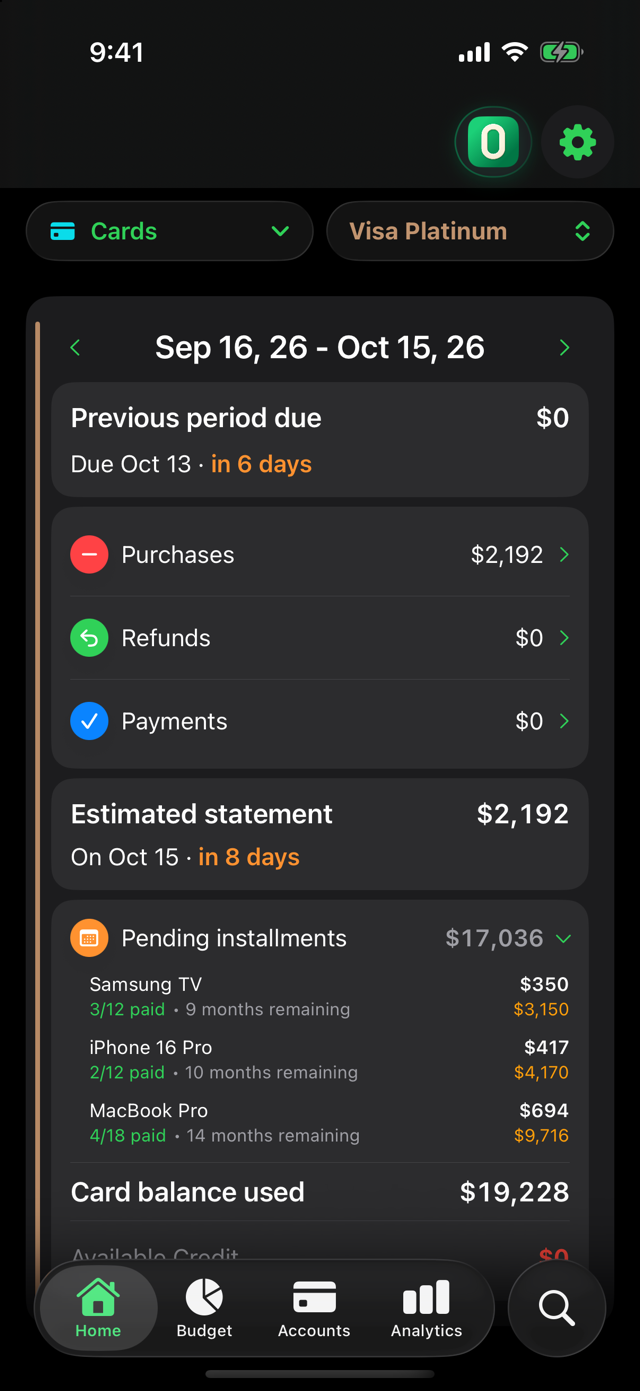
- How many you've paid and how many are left.
- The month each purchase ends.
- The total you still owe across all your installment plans.
How ZeroBudget does it
You log the purchase once and mark it as installments. The app creates each monthly payment in the period it belongs to, based on your card's closing date.
On the card screen, the Pending installments section shows each purchase with how many payments you've made, how many months remain and how much is left to pay.
One detail so you're not surprised
The monthly payments of your installment plans count toward what you'll pay each period. That's why it helps to see them together with the rest of your purchases, not separately.
Try it on your iPhone
Free to start. The first 30 days include every Pro feature, with no card and no account: your data stays on your phone.
Download on theApp Store